Paid Advertising
What Google Ads really costs a UK small business - real cost-per-click figures from our own accounts, how to set a monthly budget, and the fees nobody mentions.
Category
Paid Advertising
Published
6 November 2026
Read Time
11 min read
Summary
Google Ads has no sign-up or monthly platform fee - you set a daily budget and pay each time someone clicks. Most UK small businesses pay somewhere around £1.50 to £2.50 a click, with legal and trades costing far more, and £500 to £1,000 a month is a sensible budget to test with. On top of your clicks, Google adds a 2% UK fee, plus whatever you pay for management.
Ask how much Google Ads costs and you'll usually get "it depends", which is true and not much help when you're trying to set a budget. The honest answer is that Google Ads costs whatever you decide to spend - but what you get for that money depends on your industry, your competition and how well the account is built.
So rather than leave it there, this guide gives you real numbers. We've pulled cost-per-click figures from UK accounts we manage, set them against published UK and US benchmarks, and shown how to work out a monthly budget from the number of leads you actually need. If you're new to how paid search works, our guide to what PPC is and how the auction works is a good place to start.
We'll also cover the costs that catch people out: the 2% UK fee on every invoice, management fees, and why a cheap click isn't always the bargain it looks like.
Google Ads has no sign-up fee and no monthly platform fee. You set a daily budget and pay each time someone clicks your ad. Most UK small businesses pay around £1.50 to £2.50 a click, and £500 to £1,000 a month is a realistic budget to test with. Google adds a 2% UK fee on top.
That's the short version. The longer version is that "cost per click" covers a huge range - we see clicks as cheap as 15p and as expensive as £4.55 across our own accounts, and in legal or emergency trades it's common to pay well over £8.
What you actually spend each month is simple maths: the number of clicks you get, multiplied by what each click costs, plus any management fee. You control the budget, so you're never committed to more than you've chosen to spend.
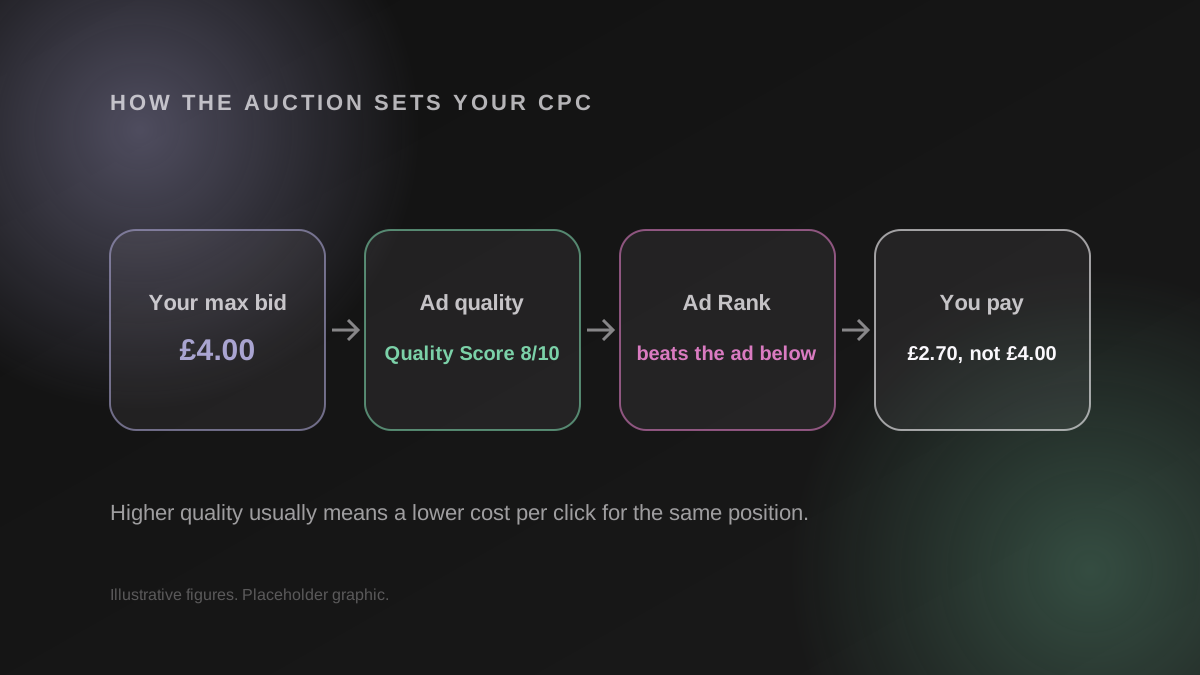
You pay when someone clicks, not when they see your ad, and you usually pay less than your maximum bid. Google runs an auction for every search, ranks the ads on bid and quality, and charges each advertiser just enough to beat the one below them.
Search ads are charged on a cost-per-click basis. Your ad can appear hundreds of times without costing a penny, and you only pay when someone clicks through to your website. That's what makes Google Ads easy to measure - every pound you spend is tied to a visit.
When you set a maximum cost per click, that's the most you're willing to pay, not what you'll be charged. Google's own explanation of actual cost per click says you're often charged less - sometimes much less - because you only pay what's needed to clear the minimum thresholds and beat the advertiser ranked below you.
Your position is decided by Ad Rank, which weighs your bid alongside the quality of your ad and landing page, the competition in that auction and the context of the search - location, device and time. That's why two businesses bidding the same amount on the same keyword can pay completely different prices.
Your daily budget is an average, not a hard cap. According to Google's guide to managing your spend, you can be charged up to twice your daily budget on a busy day, but never more than 30.4 times it across a month - the average number of days in a month. If it overspends, Google credits the difference.
Since November 2020, Google has added a 2% charge to ads shown in the UK to cover the Digital Services Tax. It's listed as the UK DST Fee in Google's jurisdiction-specific surcharges and appears on your invoice on top of your click costs. It's small, but worth building into your numbers so the bill doesn't surprise you.
Most UK small businesses pay between £1.50 and £2.50 a click, but industry changes everything. Legal keywords average over £8 a click in the UK, home services around £3.20 and dental around £2.80, while brand searches for your own business name often cost pennies.
UK benchmark data is thin on the ground - most published figures are American. The table below puts Whito's UK PPC cost research alongside the LocaliQ 2026 search advertising benchmarks, which are US figures in dollars, so treat the UK column as indicative and the US column as context.
| Industry | UK average CPC (indicative) | US average CPC (LocaliQ 2026) |
|---|---|---|
| Legal | £8.25 | $9.87 |
| Home services and trades | £3.20 | $8.33 |
| Healthcare and dental | £2.80 | $8.00 |
| B2B and business services | £3.65 | $5.87 |
| All industries | £1.50 - £2.50 (small business) | $5.42 |
Benchmarks are useful, but nothing beats real accounts. Here's what two UK accounts we manage have paid per click over the last 90 days (August to early November 2026), split between brand searches (people searching the business by name) and non-brand searches (people searching for the service).
| Business | Brand CPC | Non-brand CPC | Monthly spend |
|---|---|---|---|
| Event venue, South West England | £0.32 | £4.55 | About £250 |
| B2B industrial manufacturer | £0.77 | £2.58 | About £3,350 |
The pattern is the same in both: brand clicks cost pennies, and non-brand clicks cost between three and fourteen times more. For the venue, those £4.55 meeting room clicks still worked out at about £108 per enquiry - a sensible cost for a corporate booking worth many times that.
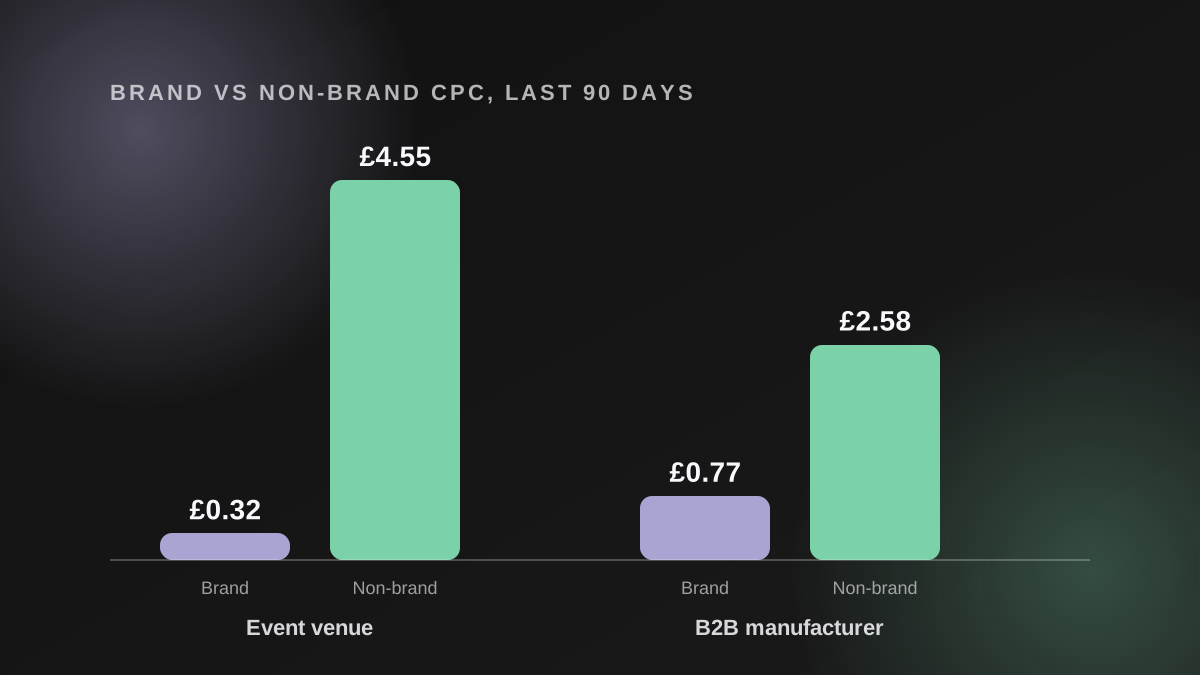
Tip: when you compare your costs to a benchmark, separate brand from non-brand first. A blended average hides how much your new-customer clicks really cost.
Click prices don't stand still. UK agency Visionary Marketing's 2026 benchmarks put the average search CPC at £3.42, up from £2.96 the year before, with legal and home services rising fastest. More advertisers are chasing the same searches, and automated bidding pushes prices up when everyone uses it - which makes a well-built account more important each year, not less.
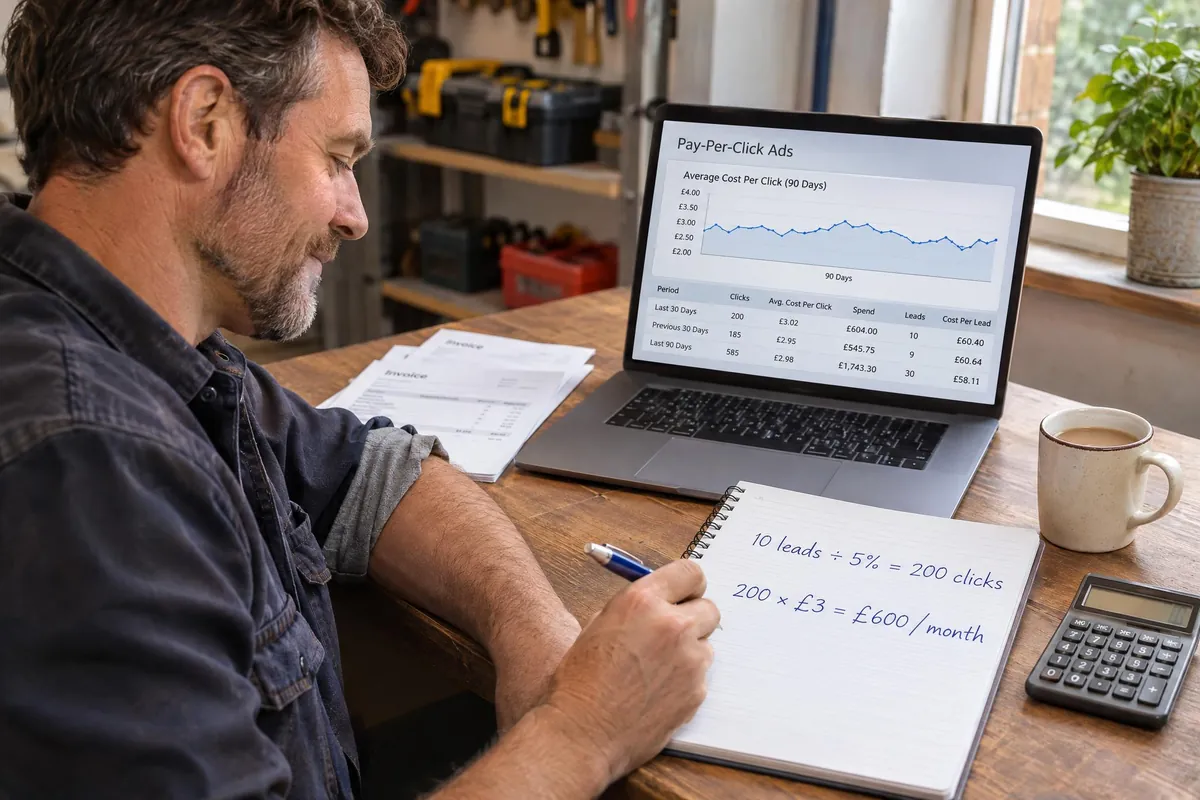
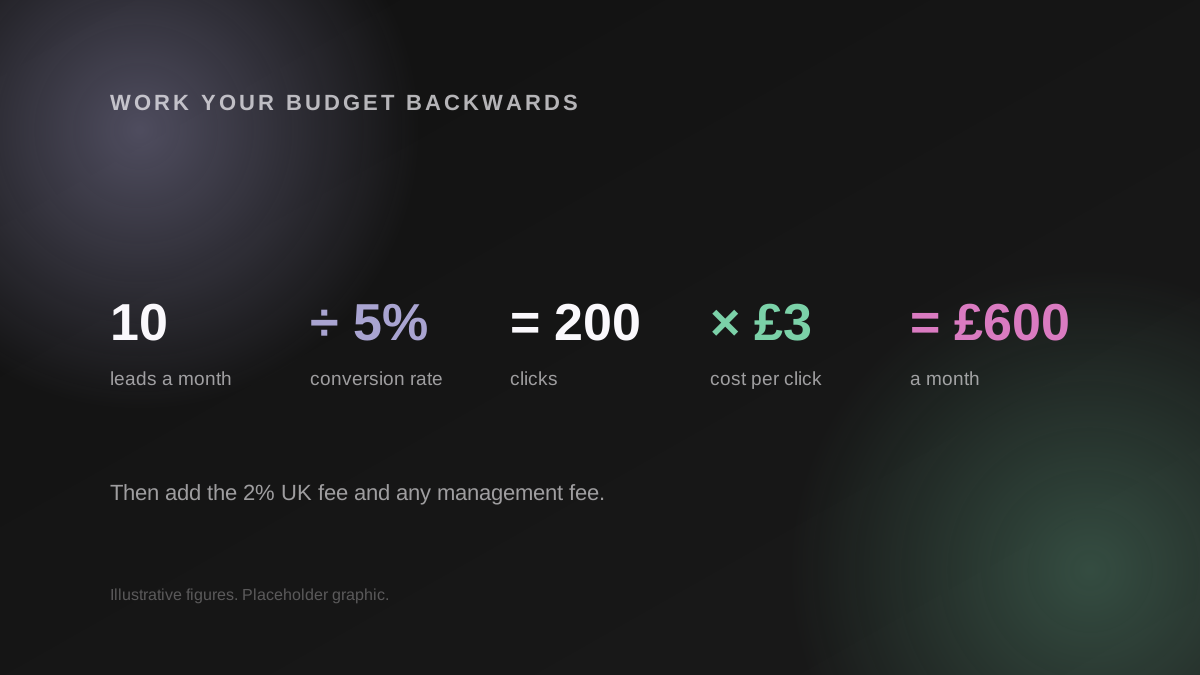
Work your monthly budget backwards from the leads you need. Divide your target leads by your conversion rate to get the clicks you need, then multiply by your cost per click. Ten leads a month at a 5% conversion rate and £3 a click is £600 a month.
Most people pick a round number and hope. Starting from the leads you actually want gives you a budget you can defend, and tells you straight away whether your target is realistic for your industry.
Google's own advice in choosing your bid and budget is to start small and check the account daily. In practice, £500 to £1,000 a month is enough for most local businesses to see whether Google Ads works, which matches what Whito's research recommends for a first test.
Keep the first campaign tight - a focused keyword list, a sensible location radius and a landing page built for the service you're advertising. A small budget spread across too many keywords never gets enough clicks on any of them to learn anything.
Tip: before you settle on a budget, work out what a customer is actually worth to you. Our guide to ROAS and break-even ROAS includes a free calculator that shows the most you can afford to pay for a sale and still make money.
The biggest influences on your cost per click are competition, Quality Score and how precisely you target. Some you can't control, like how many rivals bid on your keywords - but most of what makes accounts expensive comes down to how they're set up.
One change worth keeping an eye on: Google has announced ads in AI Mode for the UK in Q4 2026, with Search, Shopping and Performance Max campaigns eligible automatically. That's more inventory, and likely more competition, so watch your search terms closely once it rolls out.
If you hire help, management fees sit on top of your ad spend. UK freelancers typically charge £200 to £800 a month, and agencies managing smaller budgets usually charge £500 to £1,500 a month, according to Whito's research. Some charge a percentage of spend instead, usually 5 to 15%.
Running Google Ads yourself costs nothing but time, and it's genuinely doable for a simple local campaign. The cost shows up elsewhere - wasted spend on irrelevant searches, broken conversion tracking and bidding strategies that never get enough data to work. If you already run ads, our Google Ads audit checklist shows where those costs usually hide.
When you compare quotes, look past the headline number. Ask what's included (set-up, landing pages, reporting), how often the account is actually worked on, and whether you'll own the account if you leave. Our SEO and PPC packages set out exactly what we include.
If you're a trade or local service business, it's also worth knowing about Google Local Services Ads, which charge per lead rather than per click and sit above the standard ads.
Cost per click is the number everyone asks about, but it's the wrong one to judge success by. What matters is what each click turns into.
When we restructured Rainbow Garden Buildings' Google Ads account, the average click cost just £0.15, and £1,988 of ad spend produced £57,400 in revenue - a 2,899% return. But a £5 click that books a £3,000 job is just as good a deal, and often better. A cheap click that never converts is the expensive one.
It's also worth looking beyond Google. In our Microsoft Ads guide, the same B2B manufacturer paid 23% less per click on Microsoft for exactly the same keywords - extra reach at a lower price, using campaigns you've already built.
Google Ads costs what you decide to spend, but getting value from it takes a budget built around real numbers. Three things to take away:
If you'd like a second opinion on what your budget should be, book a free 30-minute strategy call and we'll go through your numbers with you. Already running ads? Our free PPC audit shows where your spend is leaking. And with ads now appearing inside AI answers, it's worth checking how visible your business is in AI search too - grab your free Answer Engine Optimisation (AEO) report.
Is there a monthly fee to use Google Ads?
No. Google doesn't charge a sign-up or monthly platform fee - you only pay for clicks, up to the daily budget you set. In the UK, Google adds a 2% fee to cover the Digital Services Tax, which shows on your invoice. If you hire an agency or freelancer, their management fee is separate.
What's a good daily budget for Google Ads?
Work it out from the leads you need rather than picking a round number. Take your target leads, divide by your conversion rate and multiply by your cost per click, then divide the monthly total by 30.4. For most UK small businesses testing Google Ads, that lands somewhere between £15 and £35 a day.
Is £500 a month enough for Google Ads?
For a local business with a tight keyword list, £500 a month is enough to test whether Google Ads works and start getting leads. It's thin for expensive sectors like legal, where clicks can cost £8 or more, because you'd only get around 60 clicks. Narrow the location and keywords so the budget isn't spread too thin.
Why was I charged more than my daily budget?
Google can spend up to twice your average daily budget on a busy day to catch extra traffic. It balances out over the month, and you won't be charged more than 30.4 times your daily budget in a calendar month. If it goes over, Google credits the difference.
How much does a Google Ads agency charge in the UK?
Freelancers typically charge £200 to £800 a month, and agencies managing smaller budgets usually charge £500 to £1,500 a month. Some agencies charge a percentage of ad spend instead, commonly 5 to 15%, which tends to apply on larger budgets. Ask whether set-up is included and whether you'll own the account.

Written By
Founder, Sway Digital • MSc Digital Marketing Communications
Philip Beaumont is the founder of Sway Digital, a digital agency built to sway your audience - combining website design & development, SEO, paid advertising, and brand identity into strategies that move the numbers that matter. He holds an MSc in Digital Marketing Communications and works hands-on with every client, from strategy through to execution.
Connect on LinkedInReady to put this into practice?
Book a free strategy call and we'll show you exactly how this applies to your business.