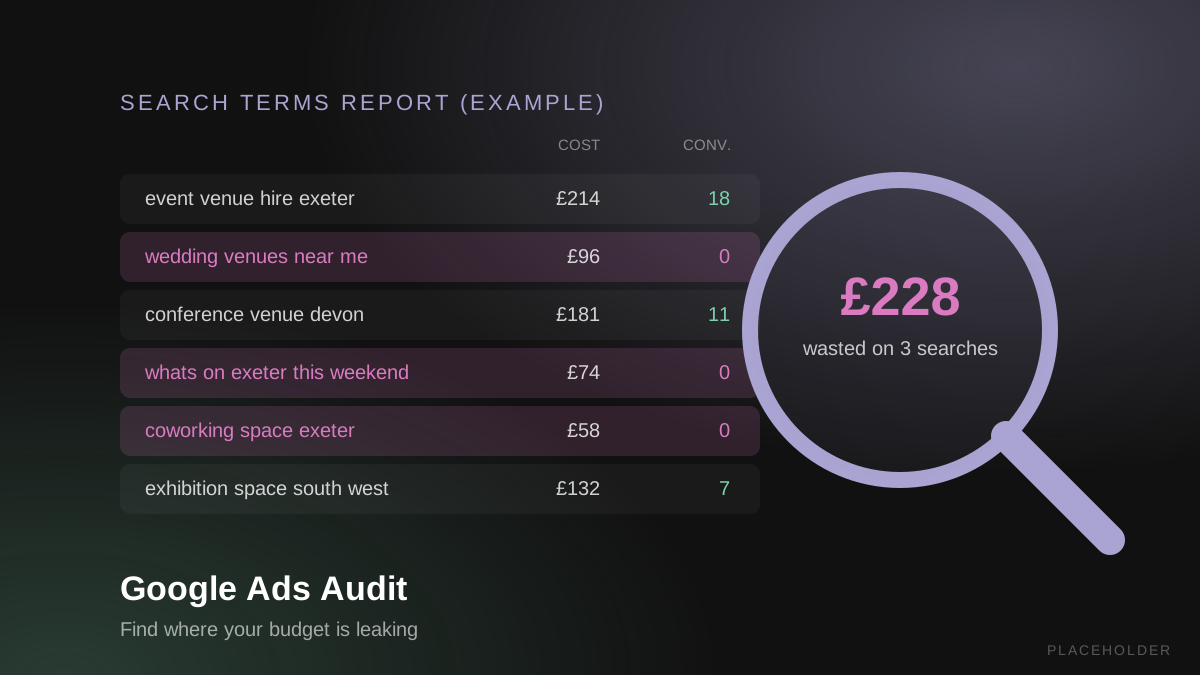
Paid Advertising
What a Google Ads audit actually checks, in the order that matters - plus the free S.T.A.B. checklist we use on client accounts, ready to copy.
Category
Paid Advertising
Published
13 November 2026
Read Time
10 min read
Summary
A Google Ads audit is a structured check of your account to find where budget is being wasted and what to fix first. Start with conversion tracking, because every other number depends on it, then work through spend, targeting, ads and landing pages, and bidding - the S.T.A.B. method. Our free checklist covers every step, split into weekly, monthly and 90-day jobs.
Google Ads will spend whatever budget you give it - it just won't always spend it well. One study of around 15,000 accounts reported by PPC Land found the average account wastes over $1,100 a month, and most of that waste is hiding in plain sight in reports nobody opens.
A Google Ads audit is how you find it. This guide walks through what a proper audit checks, in the order that actually matters, and how to run one yourself. It's built around the S.T.A.B. method we use on every Google Ads account we manage, and you can download the full checklist free at the end.
If you'd rather have someone else look, our free PPC audit does exactly this on your account.
A Google Ads audit is a structured review of your account that checks whether your tracking is accurate, where your budget goes, which searches trigger your ads, and how your ads, landing pages and bidding perform. The output is a prioritised list of fixes, starting with whatever is costing you the most money.
It's worth being clear on what an audit isn't. Google shows an optimisation score in every account, and plenty of business owners assume a high score means a healthy account. It doesn't - the score mostly reflects how many of Google's own recommendations you've applied, and applying or dismissing them moves the number either way.
An audit asks a different question: is this account turning ad spend into leads and sales, and if not, why not?
Audit your Google Ads account when you take it over, when results drop, or when costs rise without a clear reason. If you're getting clicks but no enquiries, or nobody has looked at the search terms report in months, an audit is overdue.
The warning signs we see most often:
Any one of these is reason enough. Two or more and the account is almost certainly leaking budget.
A good Google Ads audit checks conversion tracking first, then works through four areas in order: Spending and segmentation, Targeting, Ads and landing pages, and Bidding. We call this the S.T.A.B. method, and it finishes with a set of quality control checks.
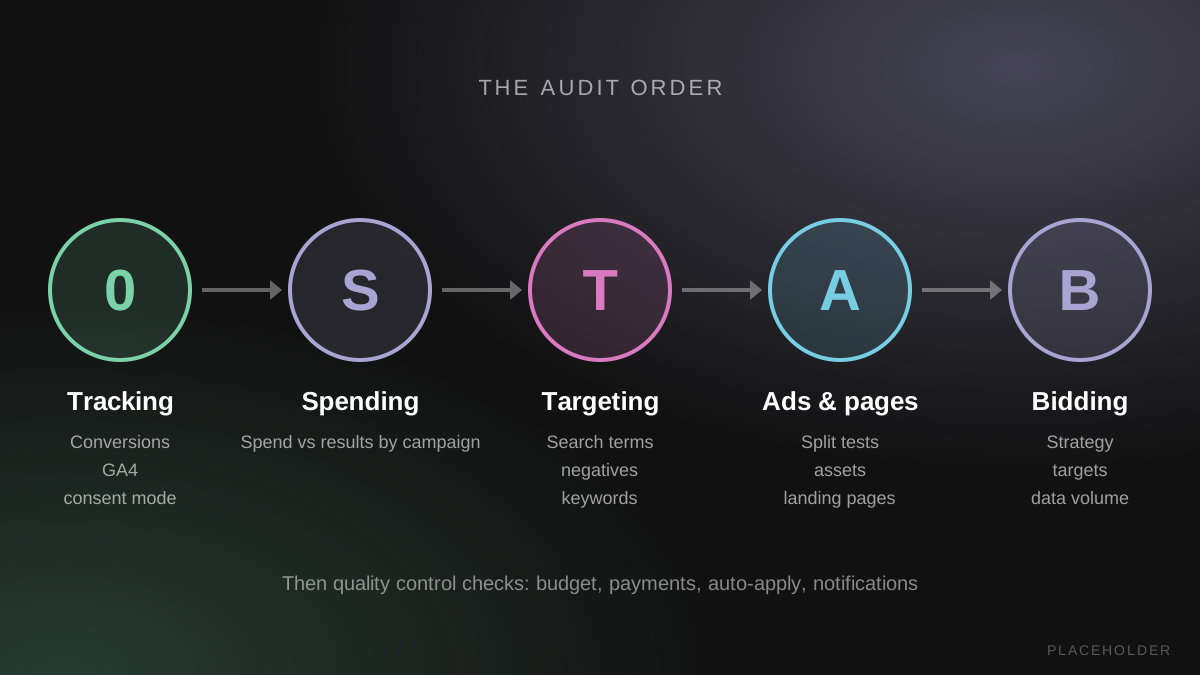
Every other number in the account depends on tracking, so it comes before anything else. If conversions are double-counted, missing or measuring the wrong thing, Google's bidding is optimising towards bad data - and so are you.
Check that each conversion action is firing and recording real enquiries or sales, that GA4 is linked, and that enhanced conversions are set up. For UK advertisers, consent mode also needs to be in place, or Google loses the signals it needs to measure and match conversions.
When we took on Rainbow Garden Buildings, fixing the tracking was the first job, before a single bid changed. That account went on to a 2,899% return on ad spend - and you can only see a number like that when the measurement underneath it is right. Our guide to what ROAS is and how to calculate it explains what to look for once tracking is sound.
Start by comparing spend with results, campaign by campaign and then ad group by ad group. You're looking for two things: campaigns that convert well but are held back, and campaigns spending money with little to show for it.
Tip: a campaign with strong conversion figures and a search impression share below 65% is usually ready for more budget. Ad groups that convert well but get little spend often deserve a campaign of their own, so they stop competing with weaker ad groups for the same budget.
This is where most wasted spend hides. Open the search terms report and read what people actually typed before they clicked. Add irrelevant searches as negative keywords, and add strong, converting searches as new exact match keywords.
Waste tends to cluster. Doctor Ads' analysis of 32 accounts found the most expensive 10% of non-converting search terms held around half of all wasted spend, so the top of that report is where to start. It's also worth knowing Google doesn't show you every search - Adthena estimated that around half of spend sits on terms grouped as "other", which is why a solid negative keyword list matters even for searches you can't see.
Beyond search terms, check:
Check that no ads are disapproved or limited, then look at your split tests. Where one ad has a clearly lower click-through rate and conversion rate, pause it, then duplicate the winner and change one thing so the next test teaches you something.
Review your ad assets - sitelinks, callouts, structured snippets, call and location assets - and replace the ones that underperform. Then compare conversion rates by landing page. A page that converts at half the rate of the others is costing you on every click it receives, however good the ad in front of it.
Check whether the bid strategy suits the data the account has. Smart bidding such as Maximise Conversions needs enough conversions to learn from - as a rule of thumb, at least one primary conversion a day over the last 30 days, with conversions rising over the past four to six weeks.
If you already use a target CPA or target ROAS, check whether the target is now holding the campaign back. Falling conversions, falling spend or a sharp drop in impressions are the usual signs the target is too tight. Our guide to Google Ads costs in the UK covers how budgets and bids interact.
Finish with the basics that quietly break accounts:
If you run Performance Max, add its own checks: review the search term insights report, add brand exclusions where it's spending on your own or competitors' brand names, and exclude irrelevant URLs. Our Performance Max campaign guide goes through these in more detail.
To audit a Google Ads account yourself, you need admin or read-only access to Google Ads and GA4, a comparison date range of at least 30 days, and a few hours. Work through tracking first, then the S.T.A.B. areas in order, writing down each problem and what it costs.
A practical order of work:
Tip: keep notes as you go. The note column in our checklist exists for exactly this, and it becomes your record of what you changed and why - which is what makes the next audit faster.
Westpoint Exeter, the South West's largest indoor arena, came to us with an account that looked busy but wasn't working hard. It ran on Performance Max and Dynamic Search Ads, with no negative keyword strategy and no clear conversion tracking, so budget was going out with very little visibility of which searches were triggering ads.
The audit showed money going on searches that were never going to book an event space - wedding venues, "what's on" tourist searches, competitor venues, coworking spaces and hotels. We rebuilt the account around intent-based Search campaigns, added more than 150 negative keywords and set up proper tracking.
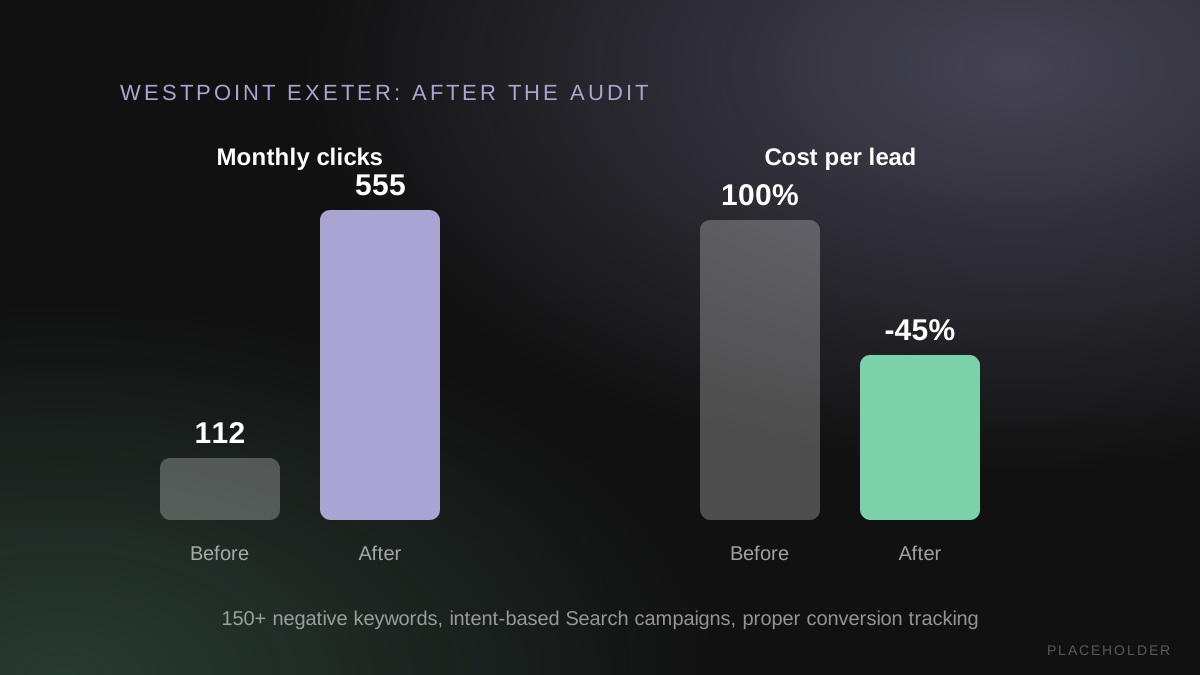
Monthly clicks went from 112 to 555, conversions tripled and cost per lead fell by 45%. The budget didn't need to grow - it needed structure. You can read the full Westpoint Exeter case study for the detail.
You can check tracking, search terms and settings yourself with the checklist below, and for a small account that's genuinely worth doing. An agency audit adds experience of what normal looks like across many accounts, which makes it faster to spot problems that aren't obvious from inside one account.
The checks that tend to need a specialist are the ones where the cause isn't visible on the surface: tracking set up in Google Tag Manager that counts the wrong thing, Performance Max spending on your own brand name, or bid targets quietly throttling a campaign. These don't show up as errors, so they're easy to miss.
Our free PPC audit covers your Google Ads or Microsoft Ads account using this same process. You'll get a short list of where money is slipping away and which fixes we'd start with, with no obligation to work with us afterwards.
Our PPC audit checklist is the S.T.A.B. method in a Google Sheet, with separate tabs for Search, Shopping, Performance Max, Demand Gen, Display and Video. Each task is marked as a weekly, monthly or 90-day job, with a notes column to record what you changed.
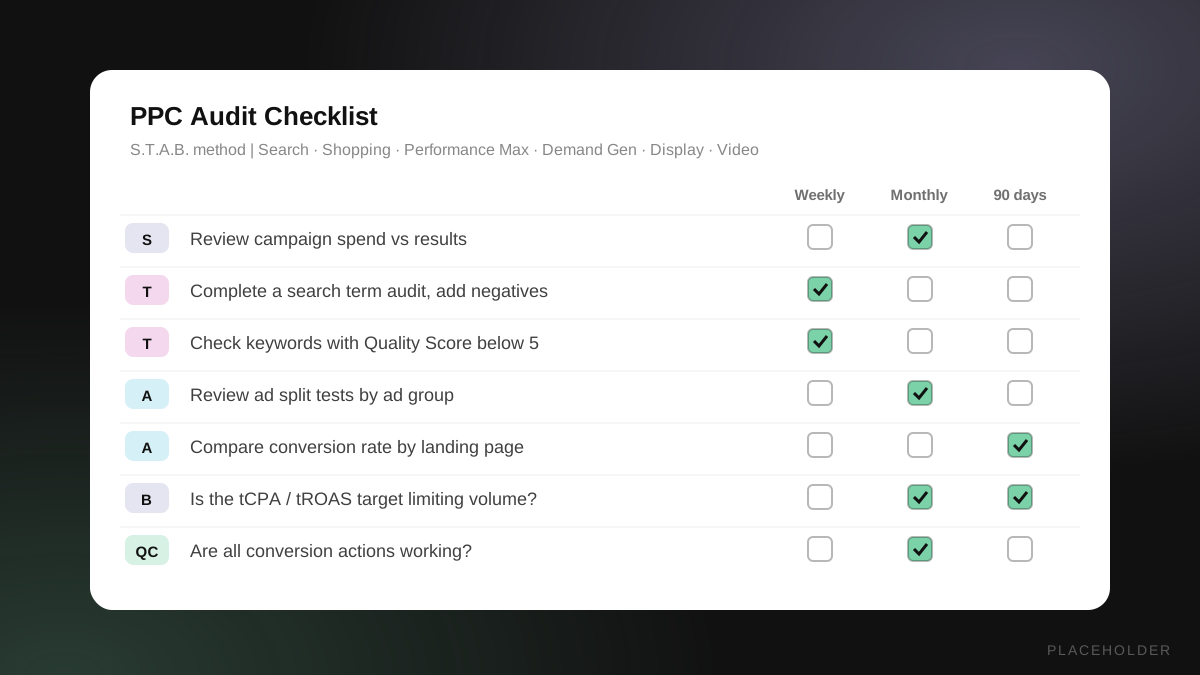
Free PPC audit checklist (Google Sheets)
Make your own copy in Google Sheets, or download it as an Excel file.
Use it in two ways. The first time through, treat it as a full audit and work every line. After that, the weekly, monthly and 90-day columns turn it into a maintenance routine - the audit finds the problems, and the checklist stops them coming back.
A Google Ads audit doesn't need to be a 100-point marathon. Three things matter most:
If you'd like a second pair of eyes, book a free 30-minute strategy call and we'll talk through what the audit found and what we'd fix first. And if you want to know whether AI assistants like ChatGPT can find your business as well as Google can, our free Answer Engine Optimisation report checks that too.

Written By
Founder, Sway Digital • MSc Digital Marketing Communications
Philip Beaumont is the founder of Sway Digital, a digital agency built to sway your audience - combining website design & development, SEO, paid advertising, and brand identity into strategies that move the numbers that matter. He holds an MSc in Digital Marketing Communications and works hands-on with every client, from strategy through to execution.
Connect on LinkedInReady to put this into practice?
Book a free strategy call and we'll show you exactly how this applies to your business.