Paid Advertising
What Microsoft Ads is, who still uses Bing in the UK, how it compares to Google Ads, what it costs, and how to get started by importing your Google campaigns.
Category
Paid Advertising
Published
9 October 2026
Read Time
12 min read
Summary
Microsoft Ads (what used to be Bing Ads) shows your search ads on Bing, Yahoo, AOL and DuckDuckGo, and inside Copilot. Bing has more than 18% of UK desktop searches, fewer advertisers compete than on Google so clicks tend to be cheaper, and you can target by LinkedIn company, industry and job function. Bring your Google Ads campaigns across, sort out tracking and bids, and you've got a low-cost second source of leads - particularly for B2B and for older, higher-income customers.
Most small businesses in the UK put their whole search budget into Google. Fair enough. But Bing handles 18.33% of UK desktop searches as of September 2026 - close to one in five - and the majority of your competitors aren't bidding on it. That's why Microsoft Ads is one of the most overlooked channels in UK paid search.
Once we're running Google Ads for a client, Microsoft Ads tends to be the next thing we talk about. The same keywords, ads and landing pages can be up and running on Bing in an afternoon. You reach a different audience, there's less competition, and for B2B the targeting is better than anything you'll find in Google.
Below we cover what Microsoft Ads is, who uses Bing these days, how it stacks up against Google and what it costs, with real figures from one of our UK accounts. Then we walk through how to get set up without burning your first month's budget.
Microsoft Ads is Microsoft's pay-per-click platform. Its official name is Microsoft Advertising, and until 2019 it was called Bing Ads - Microsoft renamed it once it stretched beyond the search engine. Your ads show up when people search on Bing and its partner sites, and you pay only for clicks.
Bing Ads, Bing PPC, Microsoft Advertising: if you've heard any of these, they all mean the same platform. Only the name is different. You bid on keywords, write text ads, set budgets and track conversions, much as you would in Google Ads.
People tend to underestimate this bit. Microsoft Ads covers far more than the Bing results page. It's a network, and it puts you in front of people on:
You get all of those audiences from a single account and a single budget. That's a lot of reach from a platform most of your competitors have never opened.
They do, and in bigger numbers than you'd guess. StatCounter's UK desktop search data has Bing on 18.33% of UK desktop searches in September 2026, with Google on 75.99%. Its mobile share is far lower, so Bing's audience is mostly people sat at a desk, and that's where plenty of buying decisions get made.
Why? Defaults. Bing comes as the default search engine in Windows and Edge, and lots of people leave it that way. At home, that's habit. On a locked-down work computer, there often isn't a choice.
Because Bing users are mostly on desktop and Windows, that decides who you'll reach. In its comparison of Microsoft Advertising and Google Ads, UK agency Semetrical says Bing users skew older, higher-income and better educated than Google users. Day to day, that usually means:
If that sounds like your customers, Bing isn't optional. It's a slice of your market you're leaving on the table.
Microsoft Ads runs almost the same way as Google Ads. The audience is smaller, fewer advertisers bid and clicks cost less. Google brings scale; Microsoft brings cheaper traffic with less competition, plus targeting Google can't offer. For most UK businesses it sits alongside Google rather than replacing it.
The two work so alike that you can copy campaigns straight over, and most people stop thinking about it there. What really sets them apart is the auction and the controls.
In any PPC auction, cost per click depends on how many businesses want the same search. Google has every agency, franchise and national brand bidding, which pushes prices up. Far fewer advertisers bother with Bing. Semetrical's comparison has Microsoft's average CPC well under Google's, but those are US averages from 2022 - which is why we've put our own UK figures in the next section.
With less competition, your ads can also keep their positions on a smaller budget. £20 a day might get you buried on Google and still keep you near the top on Bing.
There are a few settings in Microsoft Ads that Google has either taken away or never offered:
That doesn't make Microsoft Ads better than Google, which still has far more volume. It just means the second platform is more than a copy of the first.
There's no monthly fee and no minimum spend with Microsoft Ads. You choose a daily budget and only pay for clicks. The price of a click depends on your industry and how many competitors want the same keywords, but on Microsoft it's usually lower than for the same keywords on Google.
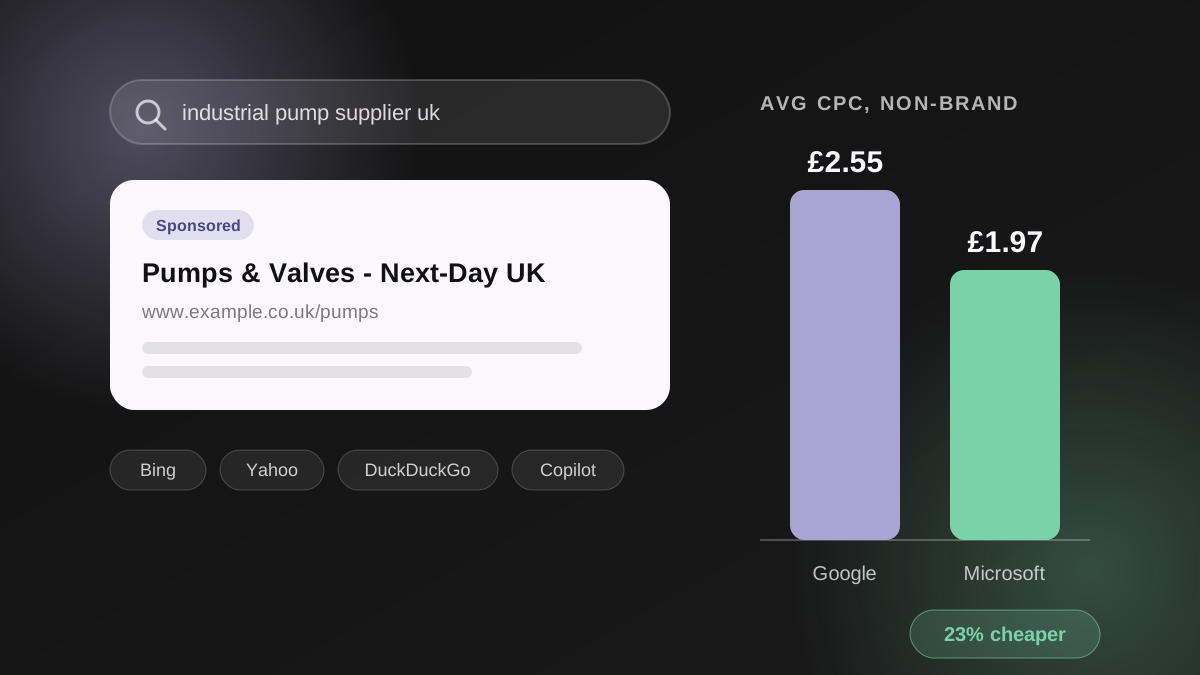
Most of the benchmarks out there are from the US and a few years out of date, so they don't tell a UK business much. Here's what we're seeing on a live account instead: a UK B2B industrial manufacturer where we bid on the same non-brand keywords on both platforms, across the same period (1 July to 8 October 2026).
| Platform | Avg CPC, non-brand search | Period |
|---|---|---|
| Google Ads | £2.55 | Jul-Oct 2026 |
| Microsoft Ads | £1.97 | Jul-Oct 2026 |
So each click on Microsoft costs 23% less for the very same searches. If you're a B2B business paying £2-£5 a click on Google, that difference soon mounts up over a year.
There's less search volume on Bing, so even with the same daily budget you'll spend less than on Google. Start somewhere around a fifth to a third of your Google budget and let the results tell you whether to scale up.
Tip: work out what a click is worth to you before you pick a budget. Our guide to what ROAS is and how to calculate it includes a free calculator that finds your break-even point in a couple of minutes.
You get the same main campaign types as in Google, so which one you pick depends on what you sell and how much control you want:
Already built Performance Max in Google? The same thinking applies here. Our Performance Max campaign guide goes through the setup, including excluding brand terms so the automation can't claim credit for searches you'd have won anyway.
Microsoft is copying Google's move towards automated search. It announced its own AI Max for search campaigns at Activate 2026, with keyword and search term reporting, brand exclusions and text guidelines, so advertisers still have a say in what the automation writes. It began as a closed pilot, and an open pilot was planned for mid-2026. For a primer on how this kind of campaign behaves, read our walkthrough of Google's AI Max for Search.
Here's the bit of Microsoft Ads that really is new. Copilot answers questions in a conversational way, and sponsored results now appear below those answers. Microsoft has been trying out richer formats too. Search Engine Land reported on Showroom ads, where people can browse products and ask questions without leaving the ad, along with Microsoft's claim that ads in Copilot are 25% more relevant than in traditional search.
Getting there doesn't need a special campaign: Performance Max campaigns are eligible to appear in Copilot search. We saw the same change in our guide to AI Overviews in Google Search - answers are taking over from lists of links, and the ads are following.
Microsoft owns LinkedIn, so Microsoft Ads can target search ads using LinkedIn profile data: company, industry and job function. You won't find that on any other search platform. For B2B, it means bidding more when a procurement manager searches and less when a student does.
Google knows plenty about what someone is searching for. What it can't tell you is whether they work somewhere that can afford what you sell, and in B2B that's often what separates a lead from a wasted click. Microsoft's own audience targeting page calls LinkedIn profile targeting unique to its platform and says advertisers who use audience targeting get a 50% higher conversion rate on average.
There are two ways to use it:
In 2026 Microsoft also cleaned this up. LinkedIn targeting now sits under Demographics, and different targeting types combine as AND conditions.
Tip: begin with bid only. Limiting ads to LinkedIn profiles cuts your volume sharply, so wait until the data shows which job functions convert before excluding anyone.
Importing your current Google Ads campaigns is the quickest way to get going. Microsoft's import tool brings your campaigns, keywords, ads and budgets over in a few minutes, and you can schedule it to keep the two accounts in step. Get tracking set up first, then correct whatever the import gets wrong.
On Microsoft, the Universal Event Tracking (UET) tag does the job of the Google tag. Without it, Microsoft's bidding has nothing to learn from and you can't tell whether a click became a lead. Put the tag on your site using Google Tag Manager, create your conversion goals - form submissions, calls, purchases - and make sure they fire before you spend anything on ads.
If you track revenue, send the conversion value across as well. Then you can measure return on ad spend on Bing in the same way you do on Google.
With Microsoft's Google Ads import you pick the campaigns to bring over and run the import once, or daily, weekly or monthly. Microsoft added an Import Center in 2026 that shows what imported cleanly and what needs looking at, so reviewing it is much faster.
Microsoft's own documentation admits not everything comes across, so see the first import as a draft rather than a finished account. Check these before going live:
Tip: only switch on the Microsoft Audience Network if you mean to, rather than leaving it on by default. It's handy for remarketing, but unchecked it can burn through budget on display clicks that seldom turn into leads.
If you already run Google Ads, then for most UK businesses the answer is yes - it's the cheapest extra reach you'll find in paid search. Three things to remember:
The catch: an imported account left to run itself rarely does well, because budgets, bids and tracking all need setting up properly for Bing. That's what we handle in our paid advertising management, running Google Ads and Microsoft Ads together, and our SEO and PPC packages show exactly what you get.
Not sure whether Microsoft Ads is right for you? Book a free 30-minute strategy call and we'll go through your Google data with you. And now that Copilot ads appear inside AI answers, it's worth seeing how visible you are in AI search as well - get your free Answer Engine Optimisation (AEO) report.
What are Microsoft Ads called now?
The official name is Microsoft Advertising, but most people just say Microsoft Ads. Until 2019 it was called Bing Ads. Microsoft changed the name because the ads no longer run only on Bing - they also appear on partner search engines, MSN, Outlook, Edge and Copilot.
Does anyone still use Bing?
Yes. StatCounter puts Bing at 18.33% of UK desktop searches in September 2026. Most of that comes from desktops and work computers, where Bing is the default in Edge and Windows, and its users tend to be older and better off than Google's.
How much do Microsoft Ads cost?
You don't pay a monthly fee and there's no minimum spend - you pick a daily budget and pay for each click. Prices depend on your industry, but with fewer advertisers competing, clicks usually cost less than on Google. On one of our UK B2B accounts, non-brand clicks on Microsoft came in 23% cheaper than the same keywords on Google.
Are Microsoft Ads worth it?
If you already run Google Ads, Microsoft Ads is usually worth a test. It brings in cheaper traffic with less competition and doesn't take much extra setup. It suits B2B particularly well because of LinkedIn profile targeting, along with anything sold to older, higher-income buyers. Think of it as an addition to Google, not a swap.
Can I run Microsoft Ads without Google Ads?
Yes. Microsoft Ads is its own platform, with a separate account, separate billing and its own campaigns. Importing from Google is the quickest way in, which is why most businesses do it, but building campaigns from scratch works fine too. Whichever route you take, get the UET tag and conversion tracking in place first.

Written By
Founder, Sway Digital • MSc Digital Marketing Communications
Philip Beaumont is the founder of Sway Digital, a digital agency built to sway your audience - combining website design & development, SEO, paid advertising, and brand identity into strategies that move the numbers that matter. He holds an MSc in Digital Marketing Communications and works hands-on with every client, from strategy through to execution.
Connect on LinkedInReady to put this into practice?
Book a free strategy call and we'll show you exactly how this applies to your business.