
Organic Marketing
Universal Analytics is gone and GA4 is the only option left. Here are the 7 key differences you need to understand before you rely on your new dashboard.
Category
Organic Marketing
Published
22 July 2026
Read Time
11 min read
For many years, Universal Analytics (UA) was the only Google Analytics platform we knew. Then in October 2020, Google announced Google Analytics 4 (GA4).
And nothing changed for a while…
Almost three years later, on 1st July 2023, Universal Analytics was officially deprecated (decommissioned) and replaced by GA4.
As business owners and marketing experts, we now have no choice but to adopt Google Analytics 4.
But before you head straight into your new setup, you'll want to be aware of the 7 key differences between the two platforms.
In this post, we'll break down the key differences between Universal Analytics and Google Analytics 4.
Essentially, Google Analytics is the umbrella term for both Universal Analytics and Google Analytics 4. Both platforms collect data derived from Google, analyse it, and provide valuable insights.
Google Universal Analytics is what many have known as Google Analytics, or simply GA, for almost two decades.
From tracking website sessions and traffic sources, to ecommerce transactions and even custom dimensions for your chosen Universal Analytics property, it's been an incredibly useful tool.
Google Analytics 4 is essentially the upgraded version of Universal Analytics.
But rather than simply a better version, it's an entirely new data collection process and visual dashboard, promising deeper insights - especially when it comes to mapping user interactions with your site (or app).
Continuation of analytics - From 1st July 2023, your Universal Analytics data streams stopped being collected by the platform. So, if you hadn't created your GA4 dashboard by then, you would have lost valuable insights from the start of July.
Keeping your historical data - For one year up to 1st July 2024, you'll still be able to view your historical data in Universal Analytics. But after that, it will be lost.
This is particularly important to consider if you use your year-on-year data for marketing campaigns or benchmarking certain events such as Cyber Monday.
Collecting data correctly is the backbone of many online businesses and those who want to market well. Consult your SEO or data expert to ensure historical data is exported and stored in the most beneficial way to your business.
As we mentioned above, there are some core differentiators when you swap from Universal Analytics to Google Analytics 4. Understanding them means you're better prepared for navigating your new dashboard. Let's take a look.
Universal Analytics had no end of menus and sub-menus to navigate through. (Thanks to this, some people preferred to use Google Tag Manager rather than UA directly.)
Whilst this was useful for diving into all the different data collected, it was also visually complicated.
Even people well versed in the world of Google Analytics would admit it wasn't the most user-friendly experience - something they've seemed focussed on fixing with the launch of GA4.

Google Analytics 4 features a redesigned and more intuitive user interface that aims to simplify data analysis and visualisation.
On first glance, it can appear almost too stripped back compared to UA. You might assume there's lots of data missing. But as we'll explore below, there's plenty of insights still available - they've just been configured slightly differently.
The "data model" is how your data stream is collected and processed. Understanding how the data models differ from one platform to the other is key, as it feeds into how the data is displayed.
The old model of Universal Analytics - Universal Analytics tracked your website traffic by way of users, sessions, and hits - a three-layer approach.
First, the user would be logged; more technically speaking, the browser you're using would be marked by the Google Analytics cookie set.
The second layer is the user's sessions. This is the time they spend active on your website, and they may visit multiple pages during a session.
Then the third layer is hits, which were the actions taken within a session such as a page view or button click.
This is a logical data model which gives a good overview of your website traffic. But it could be difficult to extract deeper analysis, especially if you're not an expert in Google Analytics or familiar with reading data in your Google Ads account.
The new model of Google Analytics 4 - GA4 utilises an event-based data model, which is essentially one layer rather than three.
This means that everything that happens on your website is an event, with sessions, users, traffic source, and lots of other useful details named as the "parameters" of an event.
The UA concept of users and sessions hasn't disappeared, but has become part of the wider picture rather than the first thing measured.
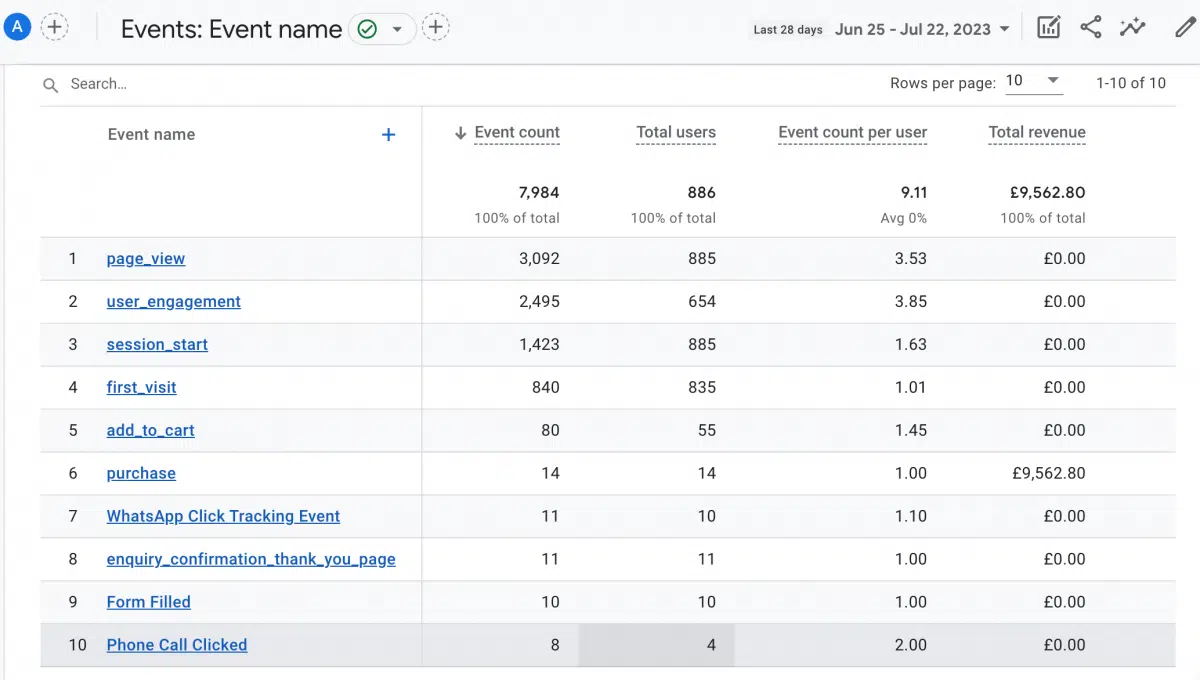
This flat-layer approach makes it much easier to track user actions such as page views, video views, button clicks, scrolls, and form fills - which in turn makes your insights into user behaviour much easier to obtain. It's essentially letting the analytics software look at everything and piece it together holistically.
A few issues that have been fixed with the new model:
This point is two-fold.
When it comes to laptops vs phones vs tablets - as we mentioned above, Universal Analytics user ID data is essentially collecting the browser data as opposed to the user behind it. So, if a user has three different devices opened, this would be three different unique users logged.
This is still the default in GA4, but there's an added advantage. If your website offers a user login, then the user login ID can be used rather than the general user ID. So, as long as your customer is logged in - a very common occurrence now for ecommerce and membership sites - then no matter how many devices they use, they will still be logged as one user.
This is highly beneficial for creating a cohesive picture of behaviour, as you can track events from their full experience, not dependent on their device.
And when it comes to app data - historically, Universal Analytics has made it difficult to track anything other than website traffic, so tracking app data has been a challenge for many businesses that couldn't afford the setup of customised platform tracking data before. But now with GA4, we finally get the ability to track data more easily across apps too, making available the insights we want as a standard feature of the analytics - again helping to build the full picture of the user experience.
Thanks to all our previous points, you might have already guessed that the overarching benefit of Google Analytics 4 is that we can understand user behaviour better than ever before.
GA4 has been created to provide a fuller picture of the user experience, providing details on tonnes of different actions they may take across our online presence, no matter their device or whether they're using our browser or app.
A good example of this is the replacement of bounce rate for engagement rate. In Google Analytics 4, a session counts as engaged when someone visits two pages or is focussed on the opened page for more than 10 seconds. This means that open tabs that are not being viewed will not be counted towards your engagement rate.
All in all, GA4 seems to want to focus on metrics that will bring true value to improving your engagement, user behaviour, and, in turn, conversions - rather than vanity metrics like sessions and bounce rates, which were good for gauging overall traffic but not specific actions.
For many businesses, this has been the missing piece standing between truly impactful developments to their marketing strategies and platform development.
Since Universal Analytics is so session-focussed, the attribution model that comes most naturally is that of "last click." This means that the traffic source of a session is attributed to the last click needed to open the session - i.e. the last bit of the path your user took to get onto your website.
But most user journeys are not linear.
For example, if you were shopping for new shoes, you might search "sandals" in Google first and click on a few Google Ads (Paid Search traffic source). The next time, you might scroll down and find the brand in the organic search results (Organic traffic source). If that brand kept coming up, next time you might not even bother searching but just type the website straight into your browser (Direct traffic source) - then finally follow through with the journey and buy some shoes.
In terms of tracking the journey, Universal Analytics would attribute the buying of the shoes to Direct traffic. But we know this isn't the full picture.
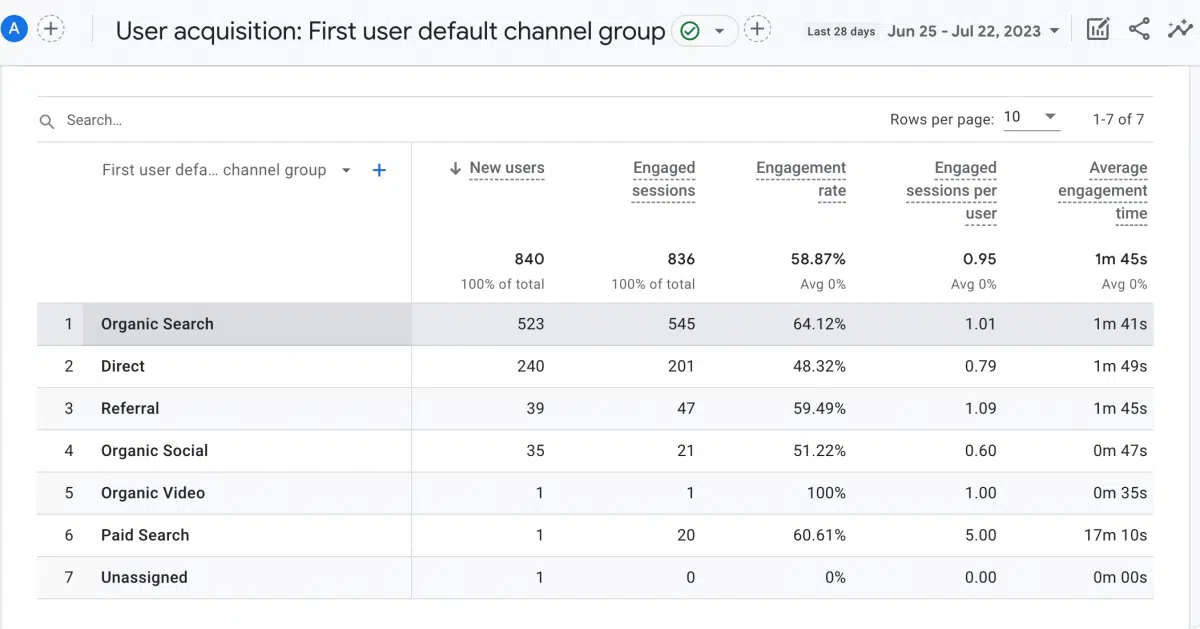
The new ways of Google Analytics 4 mean we can attribute traffic and conversions to the correct marketing channels and therefore measure their performance.
GA4 has not one but three built-in data attribution models, so you can choose the most suitable one for your own business:
No one quite knows how the algorithm works, but it is accepted that Google takes data points from a range of sources to piece together. Hopefully we'll learn more about this as GA4 becomes more commonplace.
There are four areas in which you'll find enhanced machine learning capabilities in GA4:
Insights - The insights in Google Analytics 4 are much more sophisticated, showing you any statistic you want to know, e.g. if a specific page loads slowly or if there's an anomaly in your data (in visits, traffic source, and more). UA gave some information on trends in your data but not quite in the same way as GA4 - it often required businesses to rely more on third-party tools for advanced analytics, such as Google Tag Manager and BigQuery.
Predictive metrics - GA4 is providing some predictive metrics as standard, though you can create your own too:
Predictive audiences - By collating users that are bound by these predictive metrics, you can make something called a predictive audience. You can either use the default predictive audiences related to the three metrics above, or make your own custom audiences. You can share your audiences in GA4 with your other tools, such as Google Ads, to make targeted digital marketing campaigns. It can also be used to exclude users who would be a waste of ad spend, e.g. those who've already bought from you.
Behavioural modelling - Due to our privacy laws, UK websites need a consent button for people to accept or decline being tracked by cookies, and that includes cookies powered by GA4. So what happens to your data when someone declines? Well, it's quite clever. GA4 has a "consent mode" which sends a basic set of anonymous information to a separate analytics pool. Along with the data that was consented, machine learning is used to model the behaviour of those who denied consent - Google is effectively filling the gaps for you, which might be really useful for some.
The only caveat to some of these machine learning aspects, such as predictive audience and behavioural modelling, is that you need 1,000 positive and negative points across your site per day for it to work. This would mean, for example, 1,000 people who consented and 1,000 who did not consent to your GDPR pop-up per day.
That said, the machine learning element in GA4 is something that we simply didn't have in UA. It will be interesting to see how it evolves in the future and how businesses find different ways of leveraging the new capabilities.
It might be a less interesting point than the others we've explored, but data privacy and GDPR are still of high importance to your online users. So it's well worth noting how Google Analytics 4 places a greater emphasis on data control and privacy compliance, providing businesses with more robust tools:
By offering these enhanced privacy features, Google Analytics 4 helps businesses build more transparent and privacy-friendly data practices.
Data collection, analysis, and the insights we gain from the process are the backbone of operating a website or app that achieves the goals you set - whether that's gaining visibility, leads, or direct sales.
The switch from Universal Analytics to Google Analytics 4 might take a while to get used to - much like keeping pace with changes to Google Search itself.
But in the end, GA4 promises insights that give us a deeper understanding of how our users interact with our web pages or apps, with events and their parameters helping us to create a full picture of user touch points and behaviours - all whilst providing features as standard that would previously require custom dimensions to be set.
Overall, it's sure to save everyone time and resources whilst providing a better user experience for business owners, data specialists, and marketing experts.
As a Google Partner, Sway Digital is perfectly equipped to help you with the transition to GA4.
Whether that's setting up your new dashboard, recovering historical data, or ongoing management of your website analytics, we're here for you.
Sway Digital has helped big and small businesses grow their online presence, boost website traffic, and make data-driven decisions. Get in touch with us today for more information on how you can be supported.

Written By
Founder, Sway Digital • MSc Digital Marketing Communications
Philip Beaumont is the founder of Sway Digital, a digital agency built to sway your audience - combining website design & development, SEO, paid advertising, and brand identity into strategies that move the numbers that matter. He holds an MSc in Digital Marketing Communications and works hands-on with every client, from strategy through to execution.
Connect on LinkedInReady to put this into practice?
Book a free strategy call and we'll show you exactly how this applies to your business.